Best Embroidery Machine for Business: 2026 Buyer's Guide

Article author: Editorial Team Article published at: Sep 14, 2026
Best Embroidery Machine for Business: 2026 Buyer's Guide

Table of Contents

Last Updated: September 16, 2026

Quick Comparison: Best Embroidery Machines for Business

Finding the best embroidery machine for business means matching needle count, hoop size, and throughput to your actual order volume, not a spec sheet's biggest number. At Stitch Pro Supply, we've watched new owners buy machines that impress on paper and then bottleneck a real production run. This guide covers what each machine class delivers, what it costs, and how to scale without rebuying twice.

Machine Price Needle Type Best For Standout Feature
SINGER® SE9180 $799.99 Single-needle First business, mixed sewing + embroidery 150+ built-in designs, 7" touch screen
HUSQVARNA® VIKING® DESIGNER QUARTZ™ 29 $1,399.00 Single-needle Growing Etsy and custom apparel shops 180 designs, two hoops included
HUSQVARNA® VIKING® TOPAZ™ 55Q $3,999.00 Single-needle Quilters adding embroidery to existing work JoyOS ADVISOR auto-settings, EXCLUSIVE SENSOR SYSTEM™
Key Takeaway Buy for the order volume you expect in six months, not the volume you have today. Upgrading too early wastes capital; upgrading too late costs you jobs you can't deliver on time.

Multi-Needle vs Single-Needle Embroidery Machine

The core difference between a multi-needle and a single-needle embroidery machine is thread handling: multi-needle machines hold several cones and switch colors automatically, while single-needle machines require rethreading for each color change.

SINGER® SE9180 Sewing & Embroidery Machine

Single-needle machines still make sense in specific situations:

  • You're doing flat embroidery and monogramming where most designs are one or two colors
  • You want one machine that also handles standard sewing and quilting
  • Your startup budget is tight and you're testing whether embroidery is viable
Watch Out The most common mistake new buyers make is assuming a multi-needle machine automatically produces better stitch quality. It doesn't. Stitch quality comes from proper stabilizer selection, correct tension adjustment, and good digitizing. A poorly digitized design looks bad on any machine.

Commercial Embroidery Machine Cost: What to Expect

Commercial embroidery machine cost isn't just the sticker price. The machine is the entry fee; operating costs determine whether your business stays profitable. This section builds the full total cost of ownership (TCO) picture, because that number decides whether your business survives its first year.

  • Stabilizer. Cut-away, tear-away, and wash-away stabilizer are consumed on every job. A roll of cut-away typically runs $15-$30 depending on width and weight, and a busy shop can go through a roll in a week or two, usually the largest recurring consumable cost.
  • Thread. A 5,000-meter cone of 40-weight polyester embroidery thread commonly runs $4-$8. A three-color logo on 100 shirts consumes far more than beginners expect because each color change pulls thread through the path.
  • Bobbins. Class 15/A bobbins are cheap, a 10-pack runs $3.99, but keep a steady supply so a run-out doesn't stop production mid-order.
  • Needles. Embroidery needles are replaced on a set interval, not when they break. Budget for a box at a time.
  • Backing and topping. Cap backing, water-soluble topping, and spray adhesive add up on structured and stretchy garments.
  • Digitizing. Either you learn digitizing software or you pay someone per design. Outsourced digitizing is typically priced per 1,000 stitches, so complex logos cost more than simple monograms.
Pro Tip Track your per-job consumable cost for your first 20 orders. Most new embroidery business owners underestimate stabilizer and bobbin usage because they only count thread. Once you know your real cost per stitch count, pricing gets much easier, and so does the break-even calculation.

How to Start an Embroidery Business from Home

Starting an embroidery business from home is mostly an operations problem, not a machine problem. What determines profitability is your workspace, pricing, and order flow.
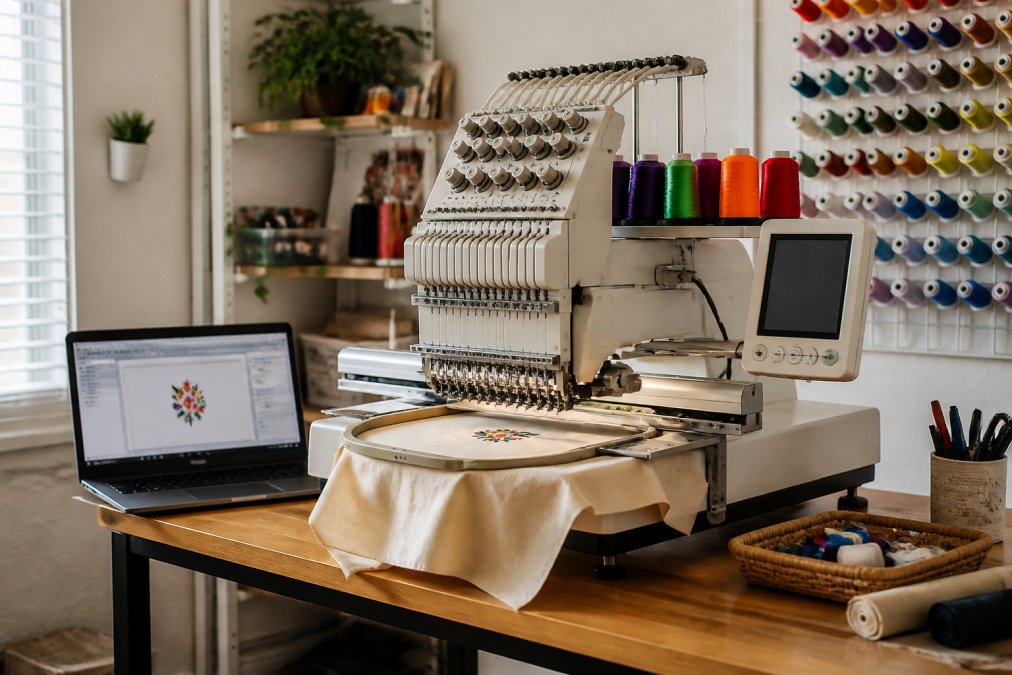
Infographic illustrating the home embroidery machine setup process with digitizing software and organized supplies

Here's the sequence that works:

  1. Define your product. Custom apparel, monogramming, and flat embroidery goods each demand different hoops, stabilizers, and design libraries. Pick one to lead with.
  2. Set up a dedicated workspace. Embroidery machines vibrate, and vibration ruins stitch quality. A stable table and a space you don't have to break down nightly matter more than square footage.
  3. Learn basic digitizing. Even if you outsource most designs, understanding stitch count, underlay, and pathing lets you spot a bad file before it wastes a garment.
  4. Price by job, not by hour. Factor in stabilizer, thread, bobbins, and machine time. A $19.99 applique scissor or a $16.50 curved scissor pays for itself fast when you're trimming jump stitches on every order.
  5. Start with one machine and a waitlist. A backlog is a better growth signal than an empty second machine.

Key Features to Look For in a Business Embroidery Machine

The features that matter for business use reduce downtime and rework: automatic thread trimmer, thread break sensor, hoop size range, and digitizing compatibility. Everything else is secondary. A touchscreen is nice and built-in designs are convenient, but without a thread break sensor you'll lose hours to ruined garments you didn't catch in time.

  • Embroidery field and hoop size. A larger field means fewer rehoopings per garment and less labor per unit. The DESIGNER QUARTZ™ 29 ships with two hoops (170 mm x 100 mm and 100 mm x 100 mm), covering most flat embroidery and monogramming. If your line includes large back-of-jacket designs or oversized totes, check the maximum field before you buy, a machine that can't fit your best-selling design is one you'll outgrow immediately.
  • Stitch count capacity and production speed. Know your machine's realistic throughput before you promise turnaround times. An 8,000-stitch design runs roughly twice as long as a 4,000-stitch one at the same speed, so stitch count, not design count, drives your scheduling.
  • Bobbin system. Top-loading bobbins are faster to swap. Confirm your machine takes Class 15/A bobbins or the equivalent before you stock up, because a mid-run bobbin change on a bottom-loading system costs more time than the bobbin itself costs money.
  • Digitizing software compatibility. USB connectivity is the baseline; cloud connectivity like CREATIVATE™ moves designs between machine, laptop, and phone. For a business, the real question is whether your software lets you edit and re-digitize quickly when a customer asks for a size change or color swap.
  • Automatic thread trimmer and thread break sensor. These two features do more for your hourly output than any other spec. An automatic trimmer eliminates the manual jump-stitch clipping that eats finishing time, and a thread break sensor stops a ruined run before it wastes a garment.
  • Warranty coverage and authorized dealer support. This is where a specialist beats a general retailer. A warranty is only as good as the service network behind it, and downtime during a busy season is the most expensive thing that can happen to a small shop.
Best For Home studio owners and Etsy sellers who need one machine that handles both sewing and embroidery without buying two separate units.

Space, Electrical, and Maintenance Requirements

Embroidery machines need more space and power than most beginners plan for, and requirements scale with needle count and production speed.

Class 15/A Bobbins for Sewing/Embroidery (10 Pack)

Electrical considerations:

SINGER® SE9180 Sewing & Embroidery →

  • Most home-studio single-needle machines run on standard household current
  • Commercial-grade multi-needle machines often need a dedicated circuit
  • Check the machine's amperage draw before you commit to a room
Watch Out Skipping lubrication to save time is the fastest way to void a warranty and shorten machine life. Follow the schedule in your manual exactly, and log each service so you can prove compliance if a warranty claim comes up.

Scalability Roadmap: Growing Your Embroidery Business

Scaling an embroidery business is a sequencing problem. The order you add capacity in determines whether growth is profitable or just busier.

The roadmap that works:

  1. One single-needle machine, manual color changes. Prove demand. Learn digitizing. Build a repeat customer base.
  2. Add a second single-needle machine before adding a multi-needle. Two machines in parallel often beat one multi-needle on total daily output for low-color work.
  3. Move to multi-needle when color changes become the bottleneck. This is the signal, not order count alone.
  4. Add dedicated finishing tools. Curved scissors for clipping jump stitches, applique scissors for grading seams, and a stabilizer reference keep finishing from becoming the new bottleneck.
  5. Only then consider commercial-grade equipment. By this point you'll know your real throughput numbers and can size the machine correctly.
Key Takeaway The scalability question isn't "how many needles can I afford?" It's "what's my current bottleneck, and does this purchase remove it?" Buy to remove a bottleneck, not to add a capability you haven't needed yet.

Conclusion

The hardest part of buying a business embroidery machine isn't choosing between models. It's resisting the urge to buy capacity you haven't earned yet and buying the right machine for the volume you actually have.

Frequently Asked Questions

Is embroidery a profitable business?

Embroidery can be profitable, especially with the right machine and pricing strategy. A single-needle machine like the SINGER SE9180 at $799.99 is a low-risk entry point for testing demand. Multi-needle machines like the HUSQVARNA VIKING DESIGNER QUARTZ 29 at $1,399.00 offer faster throughput for higher order volumes. Profitability depends on your stitch count pricing, material costs, and how well you market custom apparel to local teams, schools, and online buyers.

How much does a commercial embroidery machine cost?

Commercial embroidery machine cost varies by needle count and features. At Stitch Pro Supply, the SINGER SE9180 is $799.99, the HUSQVARNA VIKING DESIGNER QUARTZ 29 is $1,399.00, and the HUSQVARNA VIKING TOPAZ 55Q is $3,999.00. Entry-level single-needle machines start under $1,000, while multi-needle commercial-grade machines for high-volume production typically cost more. Budget for stabilizers, bobbins, and digitizing software as additional startup expenses.

Do I need a multi-needle machine to start an embroidery business?

You do not need a multi-needle machine to start. A single-needle machine like the SINGER SE9180 handles small orders and custom one-offs well. A multi-needle machine like the HUSQVARNA VIKING DESIGNER QUARTZ 29 lets you load multiple thread colors at once, which speeds up production and reduces downtime from thread changes. Start with single-needle if your order volume is under 10 items per day, then upgrade as throughput demands grow.

What is the difference between a home and a commercial embroidery machine?

Home embroidery machines are built for hobby use with lower stitch speeds and smaller hoop sizes. Commercial-grade machines run faster, handle larger embroidery fields, and are designed for continuous production with features like automatic thread trimmers and thread break sensors. The HUSQVARNA VIKING TOPAZ 55Q at $3,999.00 includes industrial durability features like the EXCLUSIVE SENSOR SYSTEM that adjusts to fabric thickness automatically, which matters when you are running production batches daily.

How much should I budget for a professional embroidery machine?

Budget between $800 and $4,000 for a professional-grade machine at Stitch Pro Supply. The SINGER SE9180 at $799.99 suits startups testing the market. The HUSQVARNA VIKING DESIGNER QUARTZ 29 at $1,399.00 adds more built-in designs and dual hoops for varied projects. The HUSQVARNA VIKING TOPAZ 55Q at $3,999.00 targets quilters and sewists who need advanced sensor systems and CREATIVATE connectivity for production work. Add $50 to $150 for stabilizers, bobbins, and thread to complete your setup.

Article author: Editorial Team Article published at: Sep 14, 2026